Getting Started
Charging
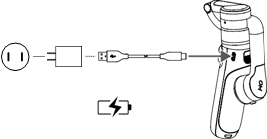
To charge
DJI OM 5, connect a USB adapter
(not included) to the charging
port using the power cable (included). The battery is fully charged
when the battery
level indicators turn off.
Charging time: 1.5 hours (tested in the environment temperature of 25° C when using a 10 W charger)
Max runtime:
6 hours (tested with the gimbal balanced and held steadily. This value should be taken as a reference
only)
Attaching the Phone
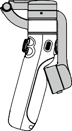
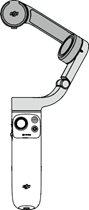
1. DJI OM 5 is folded when packaged. Unfold the gimbal as shown.
DJI OM 5 User Manual

2.
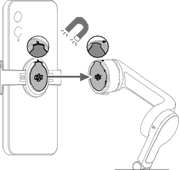
Attach the magnetic
phone clamp in the center of the phone. The magnetic phone clamp can be stretched. The camera mark should point towards the camera of the phone.
3.
Align the marks
on the phone clamp and the phone
clamp mounting plate.
Attach the mobile phone to DJI OM 5.
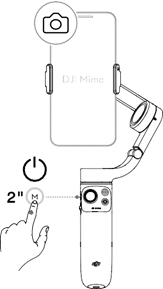
4. Press and hold the M button to power on DJI OM 5.
DJI OM 5 User Manual

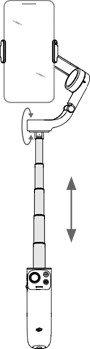
5. The built-in extension rod can be extended to up to 215 mm and the angle can be adjusted
from 0 to 90 °.
 Make sure
the direction of the magnetic phone clamp is the same as shown and it is in the middle of the phone. Otherwise, the gimbal performance may be affected.
Make sure
the direction of the magnetic phone clamp is the same as shown and it is in the middle of the phone. Otherwise, the gimbal performance may be affected.

 Adjust the phone clamp
and make sure it is as vertical like the phone.
Adjust the phone clamp
and make sure it is as vertical like the phone.
For optimal performance,
use the provided riser pad
if using a phone less than 7.5 mm
thick or weighing less than 170 g.
 Mount the mobile phone before powering on DJI OM 5. If no mobile phone is detected, DJI OM 5 will vibrate and enter standby mode. To bring it out of standby mode, press any button after mounting
the mobile phone.
Mount the mobile phone before powering on DJI OM 5. If no mobile phone is detected, DJI OM 5 will vibrate and enter standby mode. To bring it out of standby mode, press any button after mounting
the mobile phone.